




Introduction
A graphics card needs fast memory to keep up with its GPU. This memory stores textures, image data, and other information that the GPU uses to render graphics.
GDDR is short for Graphics Double Data Rate. Unlike DDR memory used as a computer's main memory, GDDR is designed for graphics systems that need high data throughput.
GDDR5, GDDR6, and GDDR7 are three generations of this technology. They differ in data rate, memory design, signaling, and power requirements.
So, which generation is better? The answer depends on the system. This guide compares their technical differences, explains what the numbers mean, and shows what to check before choosing a memory type.
Quick Comparison Table
The table below gives a quick overview before looking at each technology in detail.
|
Feature |
GDDR5 |
GDDR6 |
GDDR7 |
|
Release Date |
Around 2008 |
Around 2018 |
First products in 2024 |
|
Data rate per pin |
Up to 8 Gb/s in the cited comparison |
Up to 18 Gb/s in the cited comparison |
Up to 32 Gb/s in first-generation products |
|
Interface width per device |
32-bit |
32-bit |
32-bit |
|
Channel design |
32-bit interface |
Two independent 16-bit channels |
Four independent channels |
|
Prefetch architecture |
8n |
16n |
16n per channel in the cited architecture |
|
Signaling |
NRZ-based signaling |
NRZ |
PAM3 |
|
Operating voltage |
1.5 V; some 1.35 V |
1.35 V; some 1.25 V |
1.2 V |
| Density | 512Mb – 8Gb | 8Gb – 16Gb | 16Gb in first-generation Micron products |
|
Typical use |
Older graphics systems |
Modern graphics and selected high-throughput systems |
Newer high-performance graphics and other demanding workloads |
How Dose GDDR Memory Affect GPU Performance?
Before comparing individual generations, it helps to understand two important terms: data rate and memory bandwidth.
Data Rate
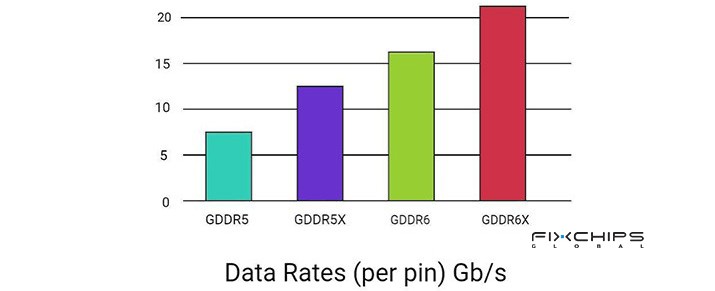
The data rate tells you how much data each memory pin can transfer per second. It is commonly stated in gigabits per second (Gb/s) per pin.
For example, a memory device rated at 8 Gb/s per pin transfers data at a lower rate than one rated at 32 Gb/s per pin. The higher rate gives the GPU more potential data throughput through the same interface width.
Memory Bandwidth
The memory bandwidth shows how much data moves each second. It depends on both the data rate and the total memory bus width.
The theoretical bandwidth can be calculated as:

For example, a 32-bit device operating at 18 Gb/s provides:
18 × 32 ÷ 8=72 GB/s
A graphics card with a wider memory bus can have a much higher total bandwidth because it transfers data over more bits at once.
Why Does Higher Bandwidth Not Always Mean Better Performance?
More bandwidth helps when the GPU needs to move large amounts of data and memory throughput limits performance.
But some workloads are limited by GPU computing power, memory capacity, software, or other system factors. In those cases, faster GDDR memory may bring a smaller improvement.
When comparing graphics cards, consider memory speed alongside bus width, capacity, GPU architecture, and the workload.
What Is GDDR5?
GDDR5 became widely used around 2008. It provided higher data rates than earlier graphics memory generations and supported many graphics cards and multimedia systems.
Although newer generations offer higher bandwidth, GDDR5 remains relevant when maintaining existing hardware or working with a design built around this memory type.
Key Technical Features
- Date Rate: 8 Gb/s per pin
- Voltage: 1.5 V; some products use 1.35 V
Memory Bandwidth
Memory bandwidth describes how much data can move between the GPU and its memory per second. It depends on the data rate and the total memory bus width.
The theoretical bandwidth of a single 32-bit GDDR5 device running at 8 Gb/s per pin is:
8 Gb/s × 32 ÷ 8=32 GB/s
This means one device can provide up to 32 GB/s of theoretical bandwidth under these conditions. The total bandwidth of a graphics card depends on the combined memory configuration.
Speed
GDDR5 provides enough bandwidth for many older graphics systems and less demanding graphics workloads. It was a major step forward from earlier graphics memory generations.
However, its data rate is lower than that of the GDDR6 and GDDR7 products compared in this article. This can limit its usefulness in newer systems that need to move large amounts of graphics data.
Memory Architecture
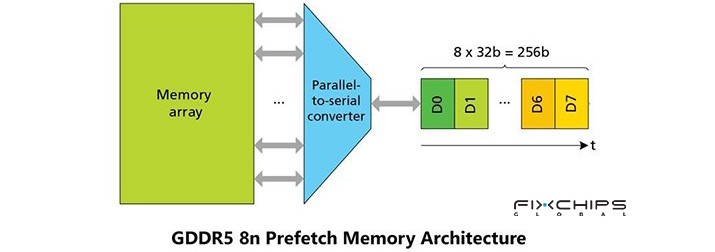
GDDR5 uses a 32-bit interface per memory device and an 8n prefetch architecture. The prefetch design allows the memory to prepare multiple data bits internally before sending them through its external interface.
This helps the device transfer data at high speed without requiring every internal operation to run at the same rate as the external data interface.
Clamshell Mode
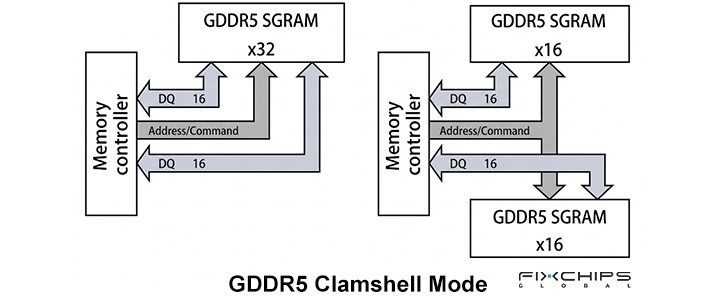
GDDR5 clamshell mode is a memory configuration that allows two GDDR5 memory devices to share the same memory channel. It can increase the total memory capacity without requiring a wider memory bus. This mode is useful when a graphics system needs more memory capacity while keeping the existing memory interface.
What Is GDDR6?
GDDR6 was developed to increase memory performance and improve power efficiency. It became commercially important around 2018 and is used in a range of graphics and other high-throughput systems.
Its main advance is not just a higher data rate. GDDR6 also changes how the memory interface is organized.

Key Technical Features
- Date Rate: 14 Gb/s per pin
- Voltage: 1.35 V; some products use 1.25 V
Memory Bandwidth
GDDR6 provides higher bandwidth than GDDR5 when the memory bus width and other conditions are comparable.
For example, a 32-bit GDDR6 device operating at 18 Gb/s per pin has a theoretical bandwidth of:
18 Gb/s × 32 ÷ 8=72 GB/s
Memory Architecture
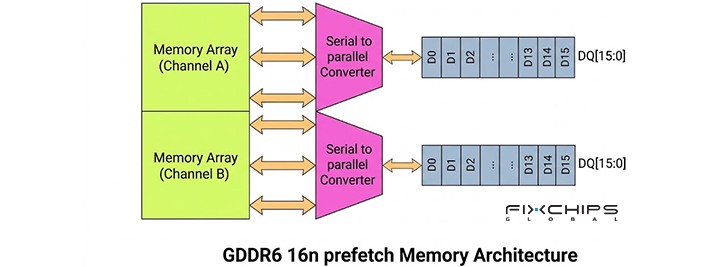
GDDR6 uses two independent 16-bit channels within a 32-bit memory device. This differs from the single 32-bit interface commonly described for GDDR5.
The two-channel structure gives the memory controller more flexibility when accessing data. GDDR6 also uses a 16n prefetch architecture, which helps support higher external data rates.
These changes are part of the reason GDDR6 can provide more bandwidth than GDDR5 without simply making the external interface wider.
Clamshell Mode
GDDR6 can also support clamshell configurations in suitable graphics designs. This can help designers increase memory capacity while working within the available board layout and memory interface.
What Is GDDR7?
GDDR7 is designed for newer graphics systems that need more bandwidth. It introduces PAM3 signaling, a revised channel structure, and additional data reliability features.
The first-generation products reach up to 32 Gb/s per pin. This is a substantial increase over the 18 Gb/s figure used for GDDR6 in the same comparison.
What Makes PAM3 Different?
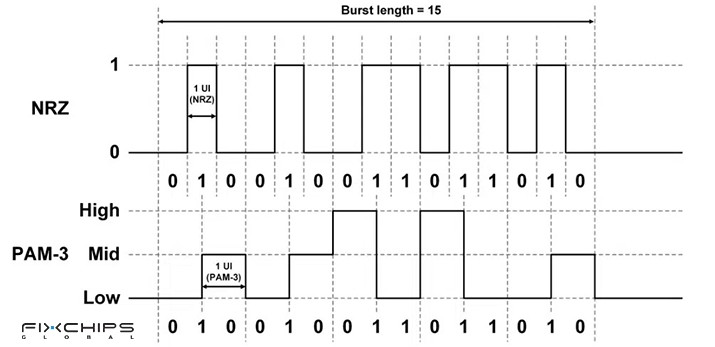
GDDR6 uses NRZ signaling, which has two signal levels. GDDR7 uses PAM3, which has three signal levels.
These three levels allow PAM3 to encode more information per signaling event than a two-level scheme. This helps GDDR7 achieve higher data rates without relying only on a proportional increase in signaling frequency.
The design is more complex, so a compatible memory controller and interface are required.
Memory Architecture
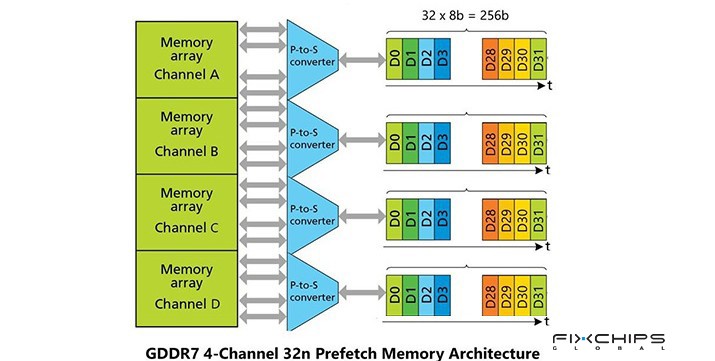
GDDR7 uses four independent channels within a 32-bit memory device. This differs from GDDR6's two independent 16-bit channels.
GDDR7 also includes features such as on-die ECC, command/address parity, and CRC. These help detect or manage certain data errors, supporting reliability at high transfer rates.
Key Technical Features
- Date Rate: 32 Gb/s per pin
- Voltage: 1.2 V
Memory Bandwidth
The cited first-generation GDDR7 products reach up to 32 Gb/s per pin. This is substantially higher than the 18 Gb/s rate used in the referenced GDDR6 comparison.
For a 32-bit GDDR7 device running at 32 Gb/s per pin, theoretical bandwidth is:
32 Gb/s × 32 ÷ 8=128 GB/s
This is the bandwidth of one 32-bit device, not the total bandwidth of a complete graphics card. A GPU's total bandwidth depends on its memory bus width and the number of memory devices.
Speed
GDDR7's higher data rate comes partly from its PAM3 signaling method and updated memory architecture. It can move more data per pin than the GDDR6 products used in the comparison.
This is useful when a GPU must handle large textures, high-resolution graphics, AI inference, or other workloads that require fast memory access.
How to Choose the Right GDDR Generation
The right generation depends on the hardware you already have and the performance you need. The newest memory is not automatically the best option for every project.
For Existing Hardware
If a graphics card or embedded system already uses GDDR5, keeping the same memory type may be the most practical choice. Switching to a newer generation can require changes to the memory controller, board layout, and validation process.
Check the original device specifications before sourcing replacement memory.
For Balanced Performance
GDDR6 is a practical option for many systems that need more bandwidth than older graphics memory can provide.
It can offer a balance between data rate, power requirements, product availability, and system cost. The best choice still depends on the GPU and the required memory configuration.
For High-Performance Designs
GDDR7 is worth considering when the design needs very high memory throughput and the GPU supports its interface.
It can be useful for demanding graphics and selected AI workloads. But the complete design must support the memory's signaling, power, layout, and controller requirements.
GDDR Typical Applications
|
Application |
Suitable generation to consider |
Main reason |
|
Older graphics cards |
GDDR5 |
Matches existing hardware designs |
|
Mainstream graphics systems |
GDDR6 |
Provides higher bandwidth for modern graphics workloads |
|
Gaming at demanding settings |
GDDR6 or GDDR7 |
Depends on GPU performance, bus width, and workload |
|
AI inference systems |
GDDR6 or GDDR7 |
Memory throughput can affect performance |
|
New high-performance GPU designs |
GDDR7 |
Supports higher data rates and improved energy efficiency in the cited products |
|
Existing product maintenance |
The original supported generation |
Avoids redesigning the memory interface |
What to Check Before Buying Memory
For component buyers and hardware designers, the generation name is only the starting point. Before selecting a memory part, check:
- Exact part number and datasheet
- Supported data rate and memory density
- Supply voltage and power requirements
- Package dimensions and ball layout
- Memory controller and PCB compatibility
- Availability, cost, and long-term supply needs
Note: GDDR5, GDDR6, and GDDR7 are not directly interchangeable. A physical package that looks similar may still have a different electrical interface or pin arrangement.
Frequently Asked Questions
Is GDDR7 better than GDDR6?
Comparing GDDR6, GDDR7 offers higher data rates and a different signaling design. However, whether it is better for a specific system depends on compatibility, workload, cost, and the GPU's ability to use the additional bandwidth.
Can GDDR5 and GDDR6 be swapped?
No. They use different memory architectures and interface requirements. The GPU, memory controller, and circuit board must be designed for the selected generation.
Is GDDR6 good for gaming?
Yes. GDDR6 provides high memory bandwidth for textures, graphics data, and other information used during game rendering. However, gaming performance also depends on the GPU, memory capacity, game settings, resolution, and other hardware.
Is GDDR the same as DDR system memory?
No. GDDR is designed mainly for graphics workloads and high memory throughput. DDR system memory serves as the computer's main memory. They use different interfaces and are not interchangeable.
How do you calculate GDDR bandwidth?
You can multiply the data rate per pin by the memory bus width, then divide by eight to convert gigabits to gigabytes. For example, 18 Gb/s on a 32-bit interface gives 72 GB/s of theoretical bandwidth.
Does GDDR7 always make a graphics card faster?
No. GDDR7 can provide higher memory bandwidth, but the real performance gain depends on the workload and GPU design. If a task is limited by computing power, software, or another system component, faster memory may have a smaller effect.
Related Articles
DDR3 vs DDR4 vs DDR5, Which One Is Suitable?


